Sentry Clip Viewer app icon
Sentry Clip Viewer · v2.7.0Tesla footage, on your Apple devices.

Every angle.
One clear story.

Watch your Tesla cameras together. Read the driving data recorded with your footage. Shape the moment into an export worth keeping.

US$6.99 one-time · iPhone, iPad & Mac
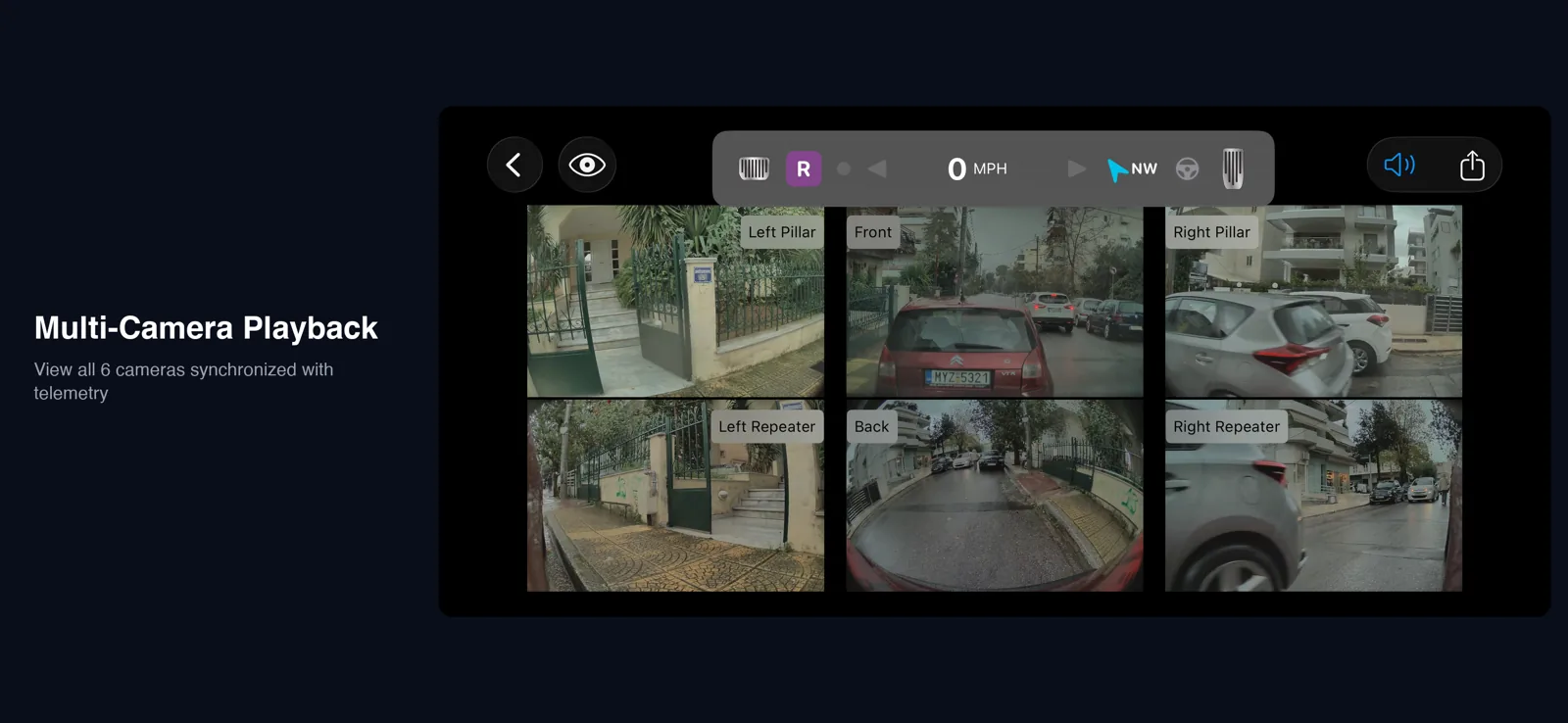
The real Sentry Clip Viewer playback screen: six synchronized Tesla camera views beneath the telemetry HUD
01 / Playback Real app. Every available perspective.
Up to six camerasFive export modesiOS 16+ · macOS 13+On-device video processing
The moment, from every side

Follow the footage.
Find the detail.

A single camera rarely tells the whole story. Bring the views together, follow consecutive clips and slow down the seconds that matter.

  1. Keep the cameras together.

    Up to six synchronized views, including pillar cameras when your vehicle records them. Hide a view or open it fullscreen.

  2. Move through the moment.

    Playback from 0.25× to 2×, with consecutive one-minute clips merged for continuous viewing.

  3. Choose what to keep.

    Set your in and out points on the timeline before you export.
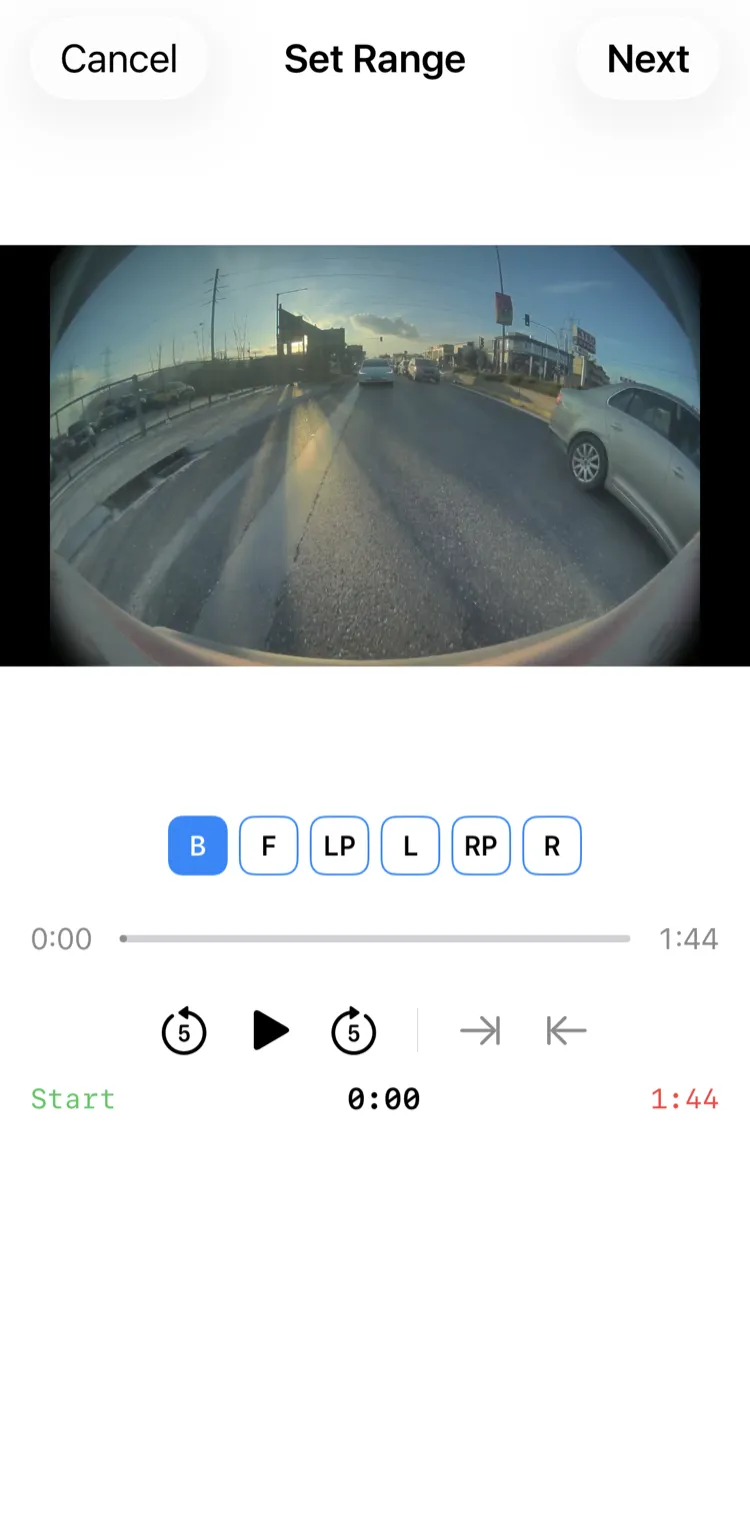
Sentry Clip Viewer’s real timeline selection screen showing the range selected for export
02 / Select the range
From review to export

Make the footage
work for you.

Keep one camera, show the grid or build a sequence with Director Mode. Add the overlays you need and preview the result before exporting.
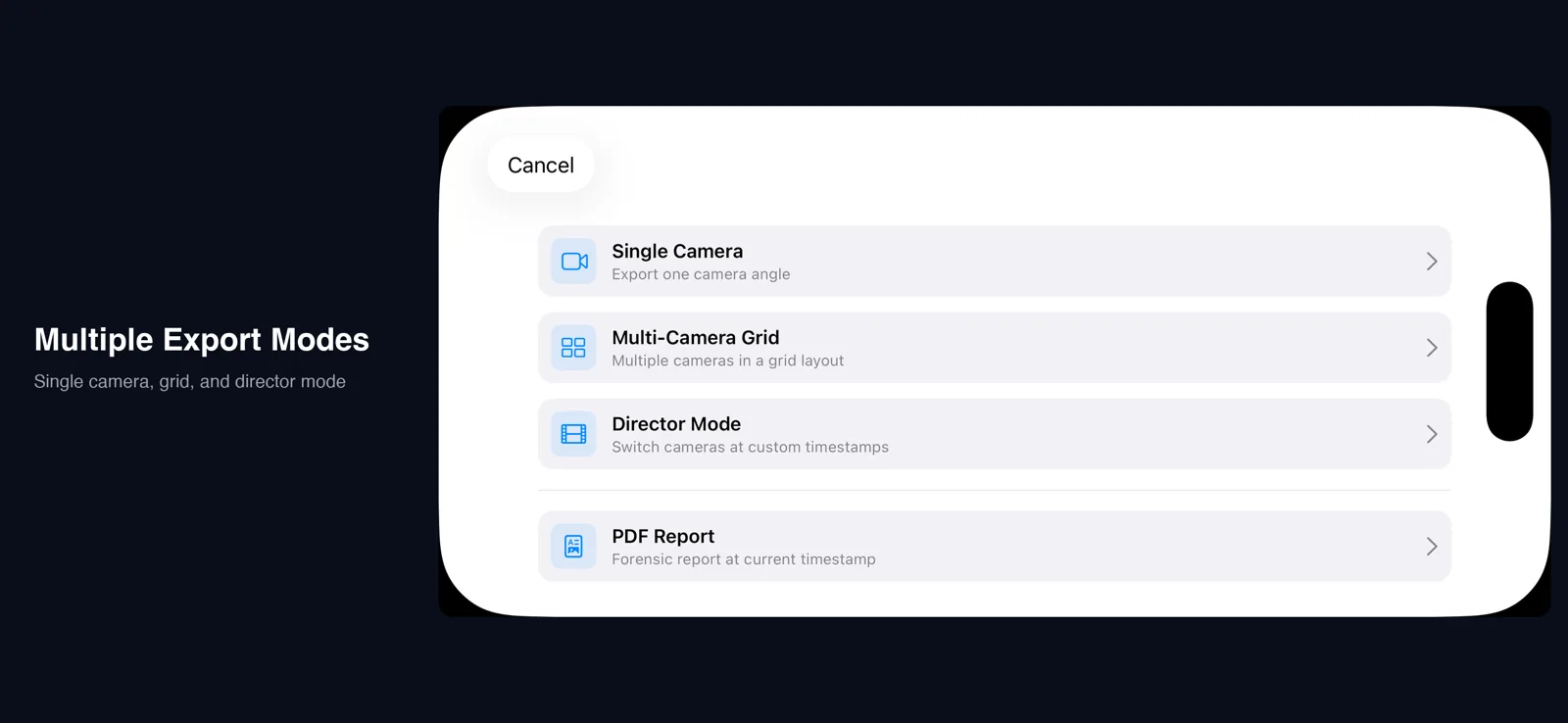
The actual export menu with camera layout, quality and overlay choices
03 / Your export, your choices

Video

Single Camera, Multi-Camera Grid and Director Mode. Resolutions up to 4K with H.264, HEVC or ProRes 422.

Post-production

Overlay Only for your editing workflow. Adjust the HUD, choose a watermark and include optional sound effects.

Documentation

Forensic PDF reports bring available routes, speed and vehicle data into a document. Check the original footage; reports do not establish authenticity or guarantee acceptance.

Context, when it was recorded

The driving data.
Alongside the drive.

The Tesla-style HUD reads available metadata embedded in the clip: speed, steering, brakes, throttle, signals, compass and driver-assistance status. Available fields vary by recording.

Optional, richer telemetry

Connect your own Tessie, TeslaMate or TeslaScope account or server for additional data such as battery, temperature, elevation and power where available. Provider terms and pricing apply.

Understand telemetry

Tesla’s recorded driver-assistance value does not reliably distinguish FSD from basic Autosteer. Do not treat the indicator as proof of either mode.

A straightforward workflow

Open. Explore. Export.

  1. 01 / Import

    Bring your footage.

    Choose your TeslaCam folder through Files or connect your USB drive. Browse Sentry, Saved and Recent clips. Action camera imports can align available provider telemetry using GPS sync.

  2. 02 / Review

    See the whole event.

    Move between camera views, inspect available telemetry and select a range. Mac, and iPad with an external keyboard on iPadOS 17 or later, support Space for play/pause, arrows for stepping, and [ / ] for speed.

  3. 03 / Export

    Keep the useful part.

    Choose the layout, resolution, codec and overlays. Export to your device; 4K ProRes needs substantial free storage.

Encrypted recordings need available Tesla keys. Sign in when prompted using an account linked to the vehicle when it recorded. This is a viewer, not a deleted-footage recovery tool.

The real workflow

Watch it in action.

GoPro footage with a TeslaMate overlay: action camera import, GPS alignment and additional vehicle data. The published walkthrough is 5 minutes 12 seconds.

YouTube loads only when you press play. This button shows an app screenshot, not a frame from the walkthrough. Watch on YouTube.

Your footage stays with you

No Qloud account.
No footage upload.

Playback, rendering and video exports happen on your device. Qloud does not receive your footage or app usage analytics.

Encrypted playback can contact Tesla with clip header metadata to obtain keys. Optional telemetry services, Apple maps/place names and network storage can also use the network.

Read the privacy policy
Before you download

A few useful answers.

Does it play Tesla's encrypted clips?
On supported vehicles with AMD Ryzen infotainment, Tesla encrypts new recordings when Encrypt Dashcam Recordings is enabled (introduced in software 2026.20). Clips recorded before the update, with the setting off, or on vehicles without this feature remain ordinary MP4 files. For encrypted clips, sign in to Tesla when prompted using an account linked to the vehicle when it recorded. The app requests available keys and decrypts locally; cached keys can avoid repeat requests for the same clips. Other recordings may need another sign-in. Sentry Clip Viewer plays existing clips; it does not recover deleted footage.
How do I import Tesla dashcam clips?
Connect your Tesla USB drive to your iPhone, iPad, or Mac. On iPhone/iPad, use the appropriate Lightning or USB-C adapter and import through the Files app. On Mac, mount the drive normally. Sentry Clip Viewer automatically detects TeslaCam and SavedClips folders.
Which Tesla camera positions are supported?
Up to 6 synchronized cameras: Front, Back, Left Repeater, Right Repeater, Left Pillar (AI4), and Right Pillar (AI4). The app automatically identifies and syncs all available camera angles.
What is the telemetry HUD?
The HUD shows available driving data recorded in Tesla’s embedded clip metadata: speed, steering, brakes, throttle, turn signals, compass and driver-assistance status. Available fields depend on the recording. Tesla’s recorded value does not reliably distinguish FSD from basic Autosteer; do not treat the indicator as proof of either mode. Optional Tessie, TeslaMate or TeslaScope connections can add data such as battery, temperature, elevation and power where available.
Do I need a Tesla API subscription for telemetry?
No subscription to Qloud is required. Core playback and embedded telemetry work without a third-party provider. Optional Tessie, TeslaMate or TeslaScope integrations use your own account or server and have their own terms and pricing.
What export formats and quality options are available?
Five export modes: Single Camera, Multi-Camera Grid, Director Mode (visual timeline with camera switching), Overlay Only, and Forensic PDF Report. Quality ranges from 720p to 4K Ultra HD with H.264, HEVC, and ProRes 422 codecs.
Does Sentry Clip Viewer work on Mac?
Yes. Sentry Clip Viewer supports iPhone and iPad running iOS/iPadOS 16 or later, and macOS 13 or later via Mac Catalyst. Mac, and iPad with an external keyboard on iPadOS 17 or later, support playback shortcuts.
Can I import non-Tesla footage?
Yes. The app supports action camera imports (GoPro, etc.) with GPS synchronisation. Non-Tesla footage can be overlaid with telemetry data and exported with available provider telemetry aligned using GPS sync.
Is my data private?
Footage is processed on your device and is not uploaded to Qloud. Encrypted playback may require Tesla sign-in and a key request containing clip header metadata. Optional telemetry providers, Apple map/place-name services and user-selected network storage may also use the network. See our privacy policy for the boundaries. Read the full policy.
How much does Sentry Clip Viewer cost?
US$6.99 one-time purchase on the App Store — no ads, no in-app purchases, no subscriptions. The optional third-party telemetry providers have their own separate pricing (TeslaMate is free and self-hosted; Tessie and TeslaScope are paid subscriptions billed by those services, not by Qloud).
Which Tesla dashcam viewer apps show all six cameras, including the AI4 pillar cameras?
Sentry Clip Viewer supports up to six synchronized Tesla cameras: front, back, left and right repeaters, plus left and right pillar cameras on supported AI4/HW4 vehicles. Vehicles without pillar recordings use the four available angles. It runs on iPhone, iPad and Mac, with a telemetry HUD and five export modes up to 4K ProRes.
What if the clips I want have already been deleted from the USB drive?
Sentry Clip Viewer plays existing footage and does not recover deleted clips. If footage is missing after deletion or formatting, stop using the source drive. Our companion app ClipSalvage for macOS and Windows can look for surviving footage. Recovery depends on remaining readable data and is not guaranteed; overwritten footage cannot be recreated. Check exports, then open recovered clips here.
iPhone · iPad · Mac

Your footage.
The complete picture.

Download on the App Store

US$6.99 one-time purchase. No Qloud subscription.
Optional telemetry services have their own terms and pricing.